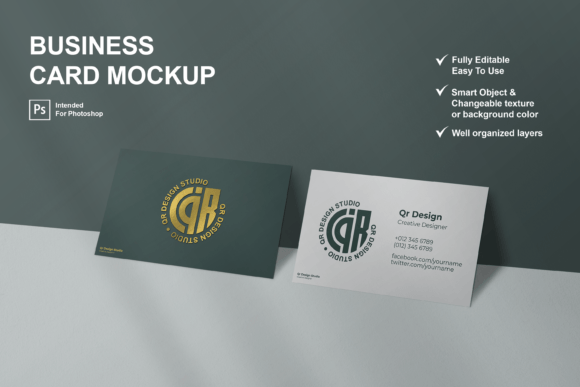
Business Card Mockups: Professional Presentation Made Easy
Business card mockups are essential tools for anyone looking to showcase their brand identity in a professional and visually appealing way. Whether you're an entrepreneur, designer, or marketer, these mockups allow you to present your business cards in a realistic 3D format that highlights your design work effectively. With the right mockup, you can create a strong first impression and communicate your brand's message with clarity and confidence.
A well-designed business card can make a lasting impact on potential clients, partners, or customers. However, simply having a good design isn't enough. You need to present it in a way that reflects the quality and professionalism of your brand. This is where business card mockups come into play. They offer a realistic view of how your card will look in real life, helping you refine your design before printing.
Why Business Card Mockups Matter
Imagine presenting a business card that looks great on your screen but fails to translate well in print. That’s where mockups become invaluable. They let you visualize your design in a real-world context, ensuring that colors, fonts, and layout are all optimized for physical presentation. This level of detail can make the difference between a memorable interaction and a forgettable one.
For professionals like graphic designers, marketers, and small business owners, using a business card mockup is not just about aesthetics—it's about efficiency. Instead of spending time trying to explain your design concept, you can show it directly. This saves time during client meetings, presentations, or when sharing your work online.
How Business Card Mockups Improve Your Workflow
The right business card mockup can streamline your workflow and enhance your creative process. Many mockups are designed as Photoshop files, allowing for easy customization through smart objects. This means you can replace your design quickly without altering the rest of the composition. The ability to adjust shadows, textures, and background colors gives you full control over the final look.
For example, if you're working on a new branding project, you can test different color schemes or font styles within the same mockup. This flexibility helps you explore various design options without starting from scratch each time. It also makes it easier to share your ideas with clients or team members, as they can see the design in a realistic setting.
Realistic 3D Views for Better Communication
One of the most compelling features of modern business card mockups is their ability to display designs in a clean, realistic 3D view. This visual representation allows you to see how your card will appear when held in hand, giving you insights into its overall appeal and usability. A 3D mockup can reveal issues such as poor contrast, awkward spacing, or unbalanced composition that might not be obvious on a flat screen.
This level of realism is especially useful for designers who want to ensure their work meets high standards. By previewing their design in a 3D environment, they can make adjustments that improve readability, visual hierarchy, and overall user experience. It also helps in communicating the intended look and feel of the card to others, reducing the chances of misinterpretation.
Customization Options for Every Need
Business card mockups often come with a range of customization options, making them suitable for a wide variety of industries and personal styles. From changing the texture of the card to adjusting the background color, these features allow you to tailor the mockup to match your brand's identity. This level of flexibility ensures that your design remains consistent across all touchpoints, reinforcing your brand image.
For instance, a minimalist design might benefit from a clean, white background with subtle shadows, while a more vibrant or artistic design could use bold textures or gradients. The ability to modify these elements without compromising the integrity of the mockup makes it a powerful tool for both beginners and experienced designers.
Who Benefits Most from Using Business Card Mockups?
Entrepreneurs and small business owners, in particular, can gain significant value from using business card mockups. These individuals often wear many hats and need efficient tools to manage their brand presence. A mockup allows them to present their work professionally without requiring advanced design skills or expensive software.
Freelancers and creatives also find mockups useful for showcasing their portfolio. By including a business card mockup in their online profile or social media posts, they can demonstrate their attention to detail and commitment to quality. This can help attract potential clients who value professionalism and consistency in design.
Practical Use Cases for Business Card Mockups
Consider a scenario where a marketing professional is preparing a pitch for a new product launch. Including a business card mockup in the presentation allows them to highlight the brand's visual identity in a tangible way. This not only makes the pitch more engaging but also reinforces the brand's message through consistent design elements.
Another example is a blogger or content creator looking to build a personal brand. By using a mockup to showcase their business card, they can maintain a cohesive look across all platforms, from their website to social media profiles. This uniformity helps establish trust and recognition among their audience.
Choosing the Right Mockup for Your Needs
Not all business card mockups are created equal. When selecting a mockup, consider factors such as resolution, layer organization, and ease of use. A high-resolution file like 3000x2000 pixels at 300 DPI ensures that your design looks sharp and clear, whether viewed on screen or printed.
Additionally, look for mockups that are fully layered and well-organized. This makes it easier to edit specific elements without affecting the rest of the design. The ability to move objects independently can be particularly useful when experimenting with different layouts or compositions.
Limitations and Considerations
While business card mockups offer many benefits, they are not a substitute for actual printing. Some details, such as the feel of the paper or the quality of the ink, cannot be accurately represented in a digital mockup. It's always a good idea to request a physical sample before finalizing your design.
Also, keep in mind that not all mockups are compatible with every version of Photoshop. Before purchasing or downloading a mockup, check the system requirements to ensure it works with your software. This can save time and avoid frustration down the line.
Incorporating a business card mockup into your workflow can elevate your brand presentation and improve communication with clients and colleagues. By leveraging the power of realistic 3D views, customizable features, and professional design tools, you can ensure that your business card makes a strong, lasting impression. Whether you're launching a new venture or refining your existing brand, a well-crafted mockup is a valuable asset in your design toolkit.