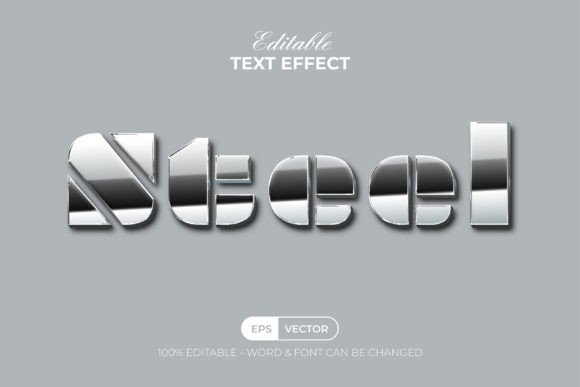
Steel Text Effect Shiny Style
If you're looking for a way to add a sleek, metallic look to your text in Adobe Illustrator, the Steel Text Effect Shiny Style could be exactly what you need. This graphic style offers a modern, eye-catching design that transforms any text or shape into a high-gloss, 3D steel effect. Whether you're a designer, marketer, or hobbyist, this tool can elevate your creative projects with minimal effort.
The Steel Text Effect Shiny Style is not a font but a set of pre-designed effects that are ready to use in Adobe Illustrator's graphic styles menu. This means you can easily apply the effect to any text or shape without needing advanced design skills. The simplicity of this feature makes it accessible for beginners and efficient for professionals who want to save time on repetitive tasks.
Key Features of the Steel Text Effect Shiny Style
This set includes several features that make it both powerful and user-friendly:
- Easy to edit – You can modify the effect to suit your specific needs, adjusting colors, shapes, and other elements as required.
- Well-organized layers – The design is structured in a way that makes it easy to navigate and customize, even if you're not an expert in Illustrator.
- 100 editable text and font options – With a variety of text styles and fonts included, you can experiment with different looks and find the perfect match for your project.
- RGB color support – The effect uses standard RGB color values, making it compatible with most digital platforms and ensuring vibrant results.
- Free font used – No need to purchase additional fonts—this effect uses a free font that’s ready to go out of the box.
- Read Me text included – A helpful guide is provided to ensure you understand how to use and customize the effect effectively.
What Makes It Useful?
The Steel Text Effect Shiny Style is ideal for anyone looking to create visually appealing designs quickly. Its 3D steel effect adds depth and realism, making it perfect for logos, banners, social media graphics, and more. The shiny, reflective surface gives your text a professional and modern feel, which can help your work stand out in a competitive market.
For example, if you're designing a logo for a tech startup, using this effect can give your brand a sleek and innovative image. If you're creating marketing materials, the effect can make your headlines more engaging and memorable. Even in educational settings, students can use this tool to create dynamic presentations or visual aids that capture attention.
How to Use the Steel Text Effect Shiny Style
Using this effect is straightforward. Once you’ve downloaded the file, open Adobe Illustrator and import the graphic styles. Select the text or shape you want to apply the effect to, then choose the appropriate style from the graphic styles menu. You can then tweak the effect by adjusting colors, gradients, and other properties to match your vision.
One of the biggest advantages of this tool is that it doesn’t require complex steps or technical knowledge. Even if you’re new to Adobe Illustrator, you can apply the effect in just a few clicks. Plus, because the layers are well-organized, you can easily adjust individual elements without disrupting the overall design.
Best Uses for the Steel Text Effect Shiny Style
This effect is versatile and can be used in a wide range of contexts. Here are some practical examples:
- Logos and branding – Create a strong visual identity for your business with a polished, metallic look.
- Social media graphics – Make your posts more eye-catching with bold, reflective text that grabs attention.
- Web and app design – Add a touch of sophistication to buttons, headers, or other UI elements.
- Print materials – Use it in brochures, posters, or business cards to make your designs more striking.
- Personal projects – Whether you're working on a portfolio or a creative hobby, this effect can enhance your work with a professional finish.
Considerations Before Using the Steel Text Effect Shiny Style
Before diving into using this effect, there are a few things to keep in mind. First, make sure your version of Adobe Illustrator is CC or above, as the effect may not work properly on older versions. Also, while the effect is easy to use, it’s important to understand the basics of graphic styles and layer management to get the best results.
Another consideration is the file format. The package includes .AI and .EPS files, along with a JPEG preview, so you can choose the format that works best for your workflow. If you're planning to use the effect in commercial projects, check the licensing terms to ensure you have the right to do so.
Lastly, while the effect is pre-designed, don’t be afraid to experiment with different text styles, colors, and shapes. The more you play around with it, the more you’ll discover its potential and how it can fit into your creative process.
Why Choose the Steel Text Effect Shiny Style?
The Steel Text Effect Shiny Style offers a unique blend of simplicity and power. It allows you to achieve professional-grade results without the need for complex design skills or extensive time investment. Whether you're working on a personal project or a client’s request, this effect can help you deliver high-quality visuals that impress and engage your audience.
With its easy-to-edit features, organized layers, and compatibility with Adobe Illustrator, this tool is a valuable addition to any designer’s toolkit. It’s also a great option for those who want to explore the world of graphic design without getting overwhelmed by technical details.